Local-first · AES-256-GCM · Open Source

Lock your secrets back into your own device

FlintKeep is a local-first vault for credentials and assets: servers, platform accounts, API keys and project files — all encrypted on your own machine with AES-256-GCM. An AI assistant helps you use them, but the data never leaves the device.

Data stays on-device AGPL-3.0 Native MCP integration macOS · Windows · Linux
Unlocked AES-256-GCM · on-device Cloud copies: 0 Internet ✗ can't reach it
Product Tour

Inside the vault

The real interface, running on demo data. Six of the everyday screens.
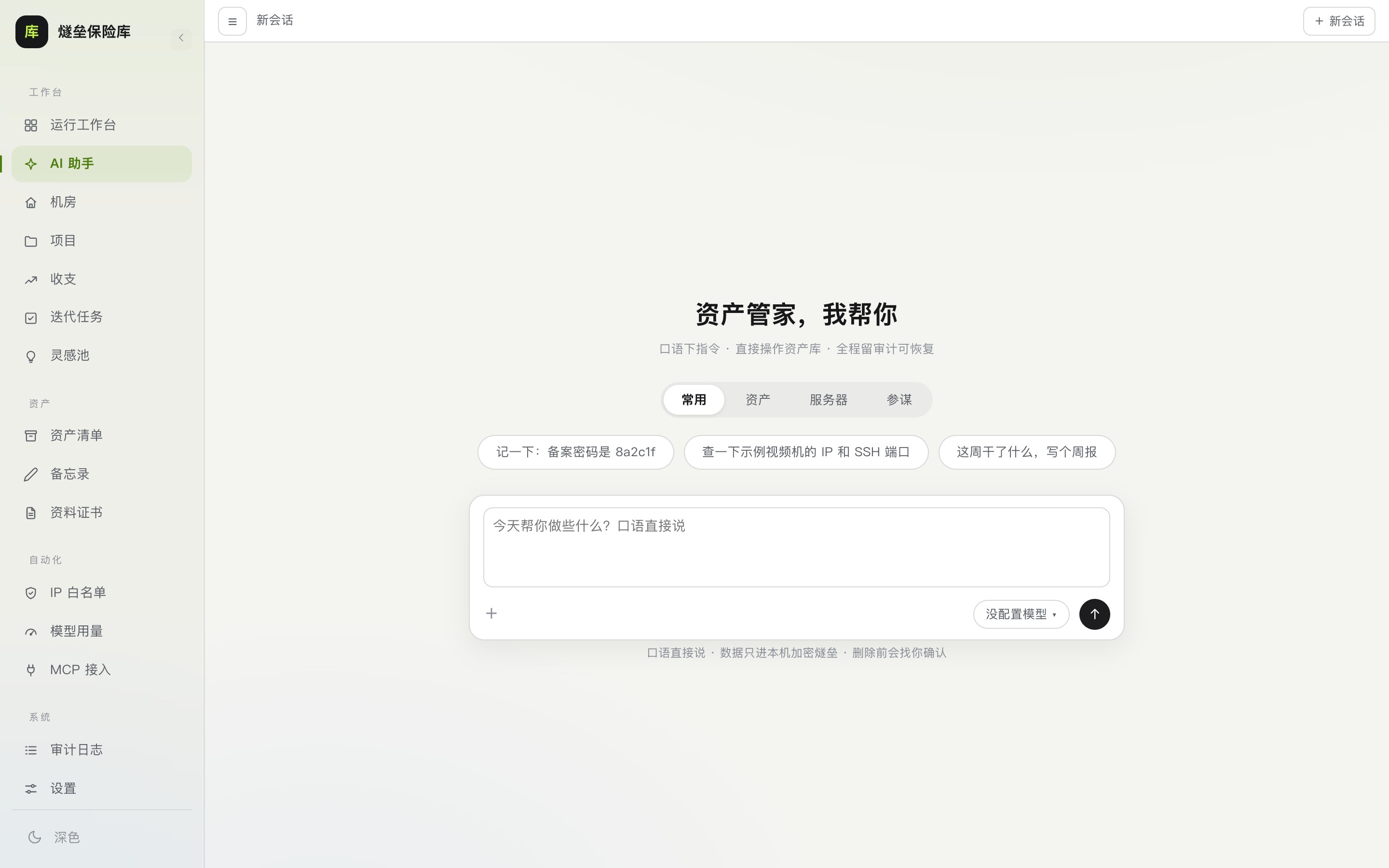
flintkeep.pages.dev / assistant
AI assistant
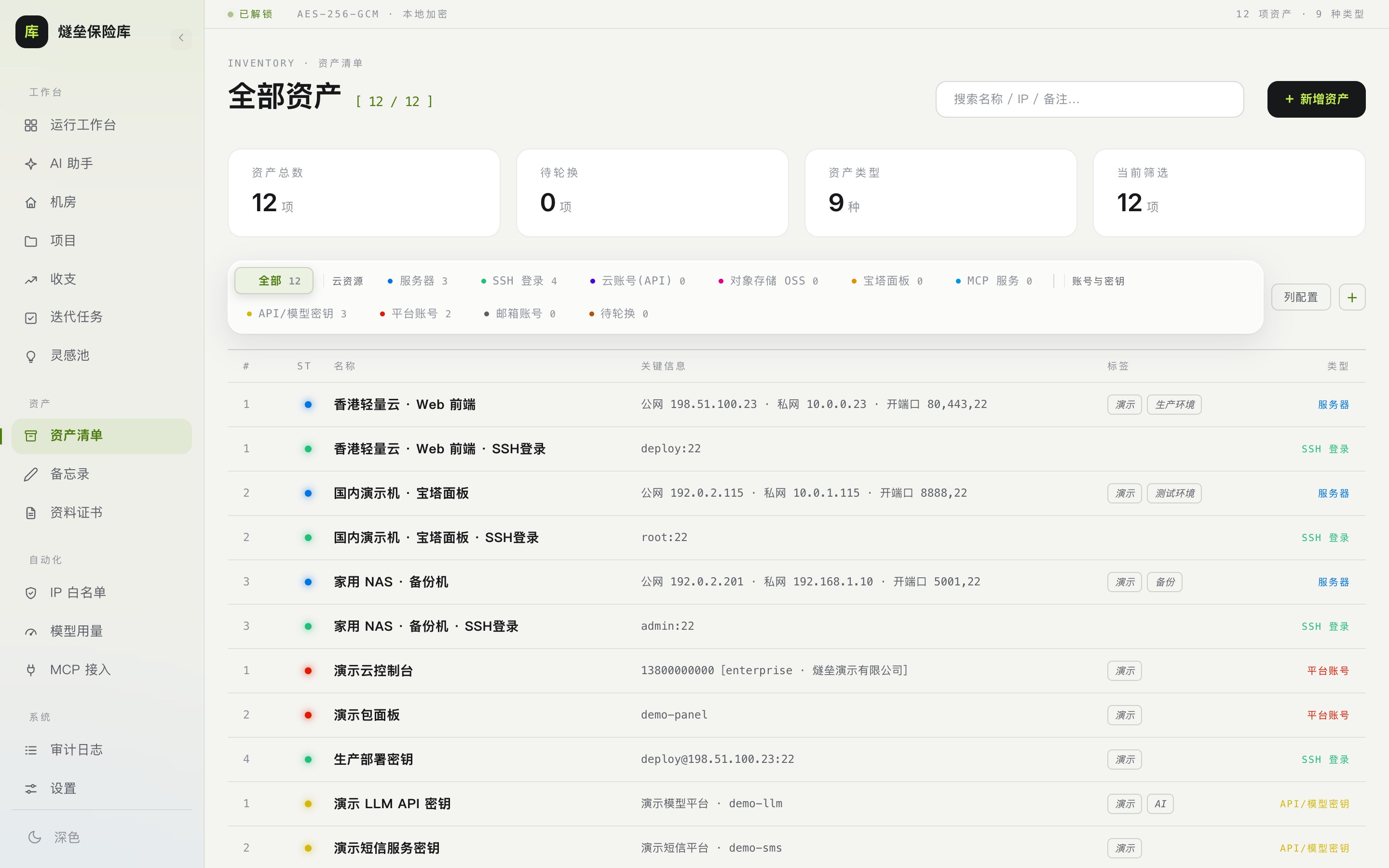
flintkeep.pages.dev / inventory
Asset inventory
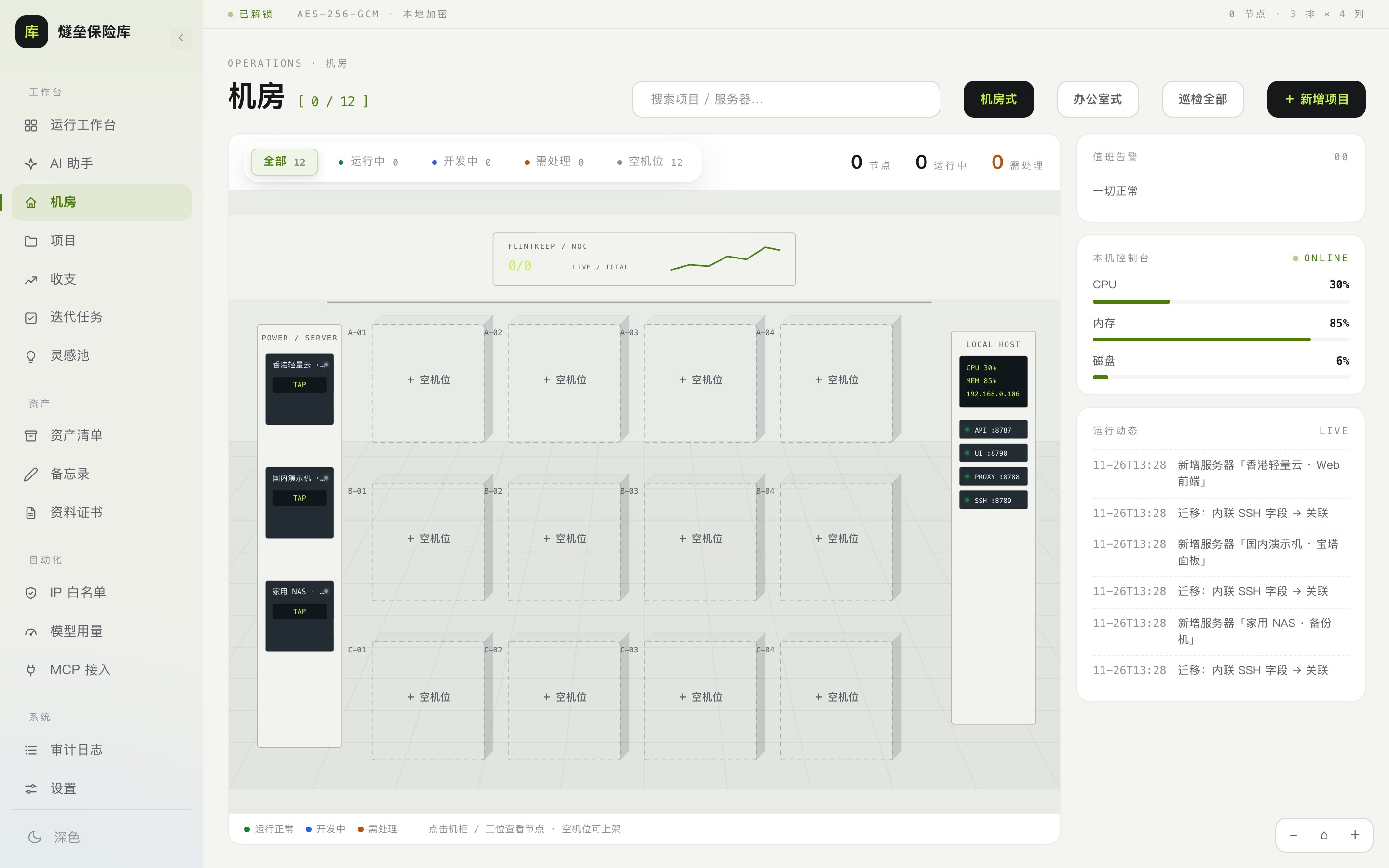
flintkeep.pages.dev / noc
Server room NOC
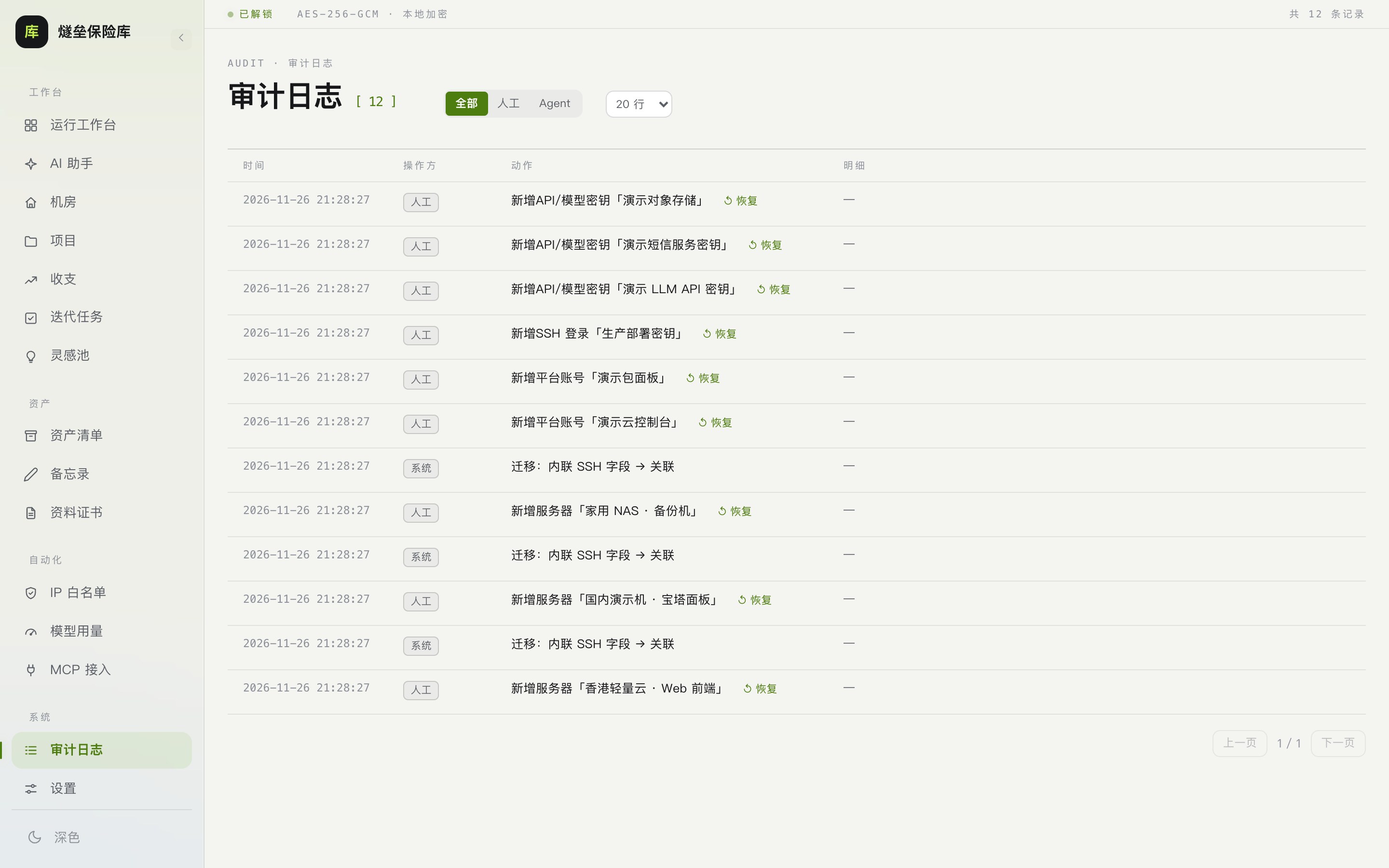
flintkeep.pages.dev / audit
Audit log
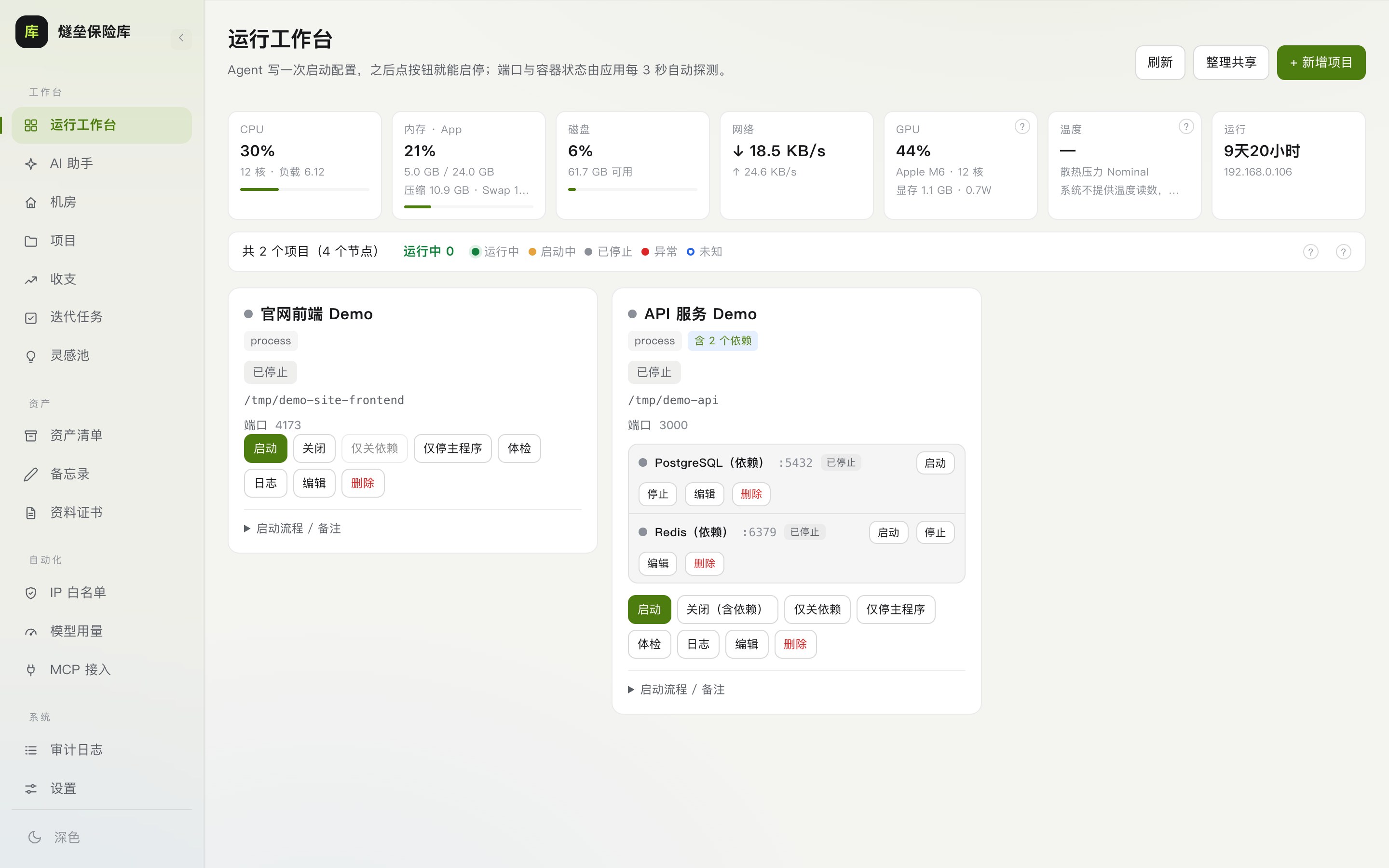
flintkeep.pages.dev / runner
Run workbench
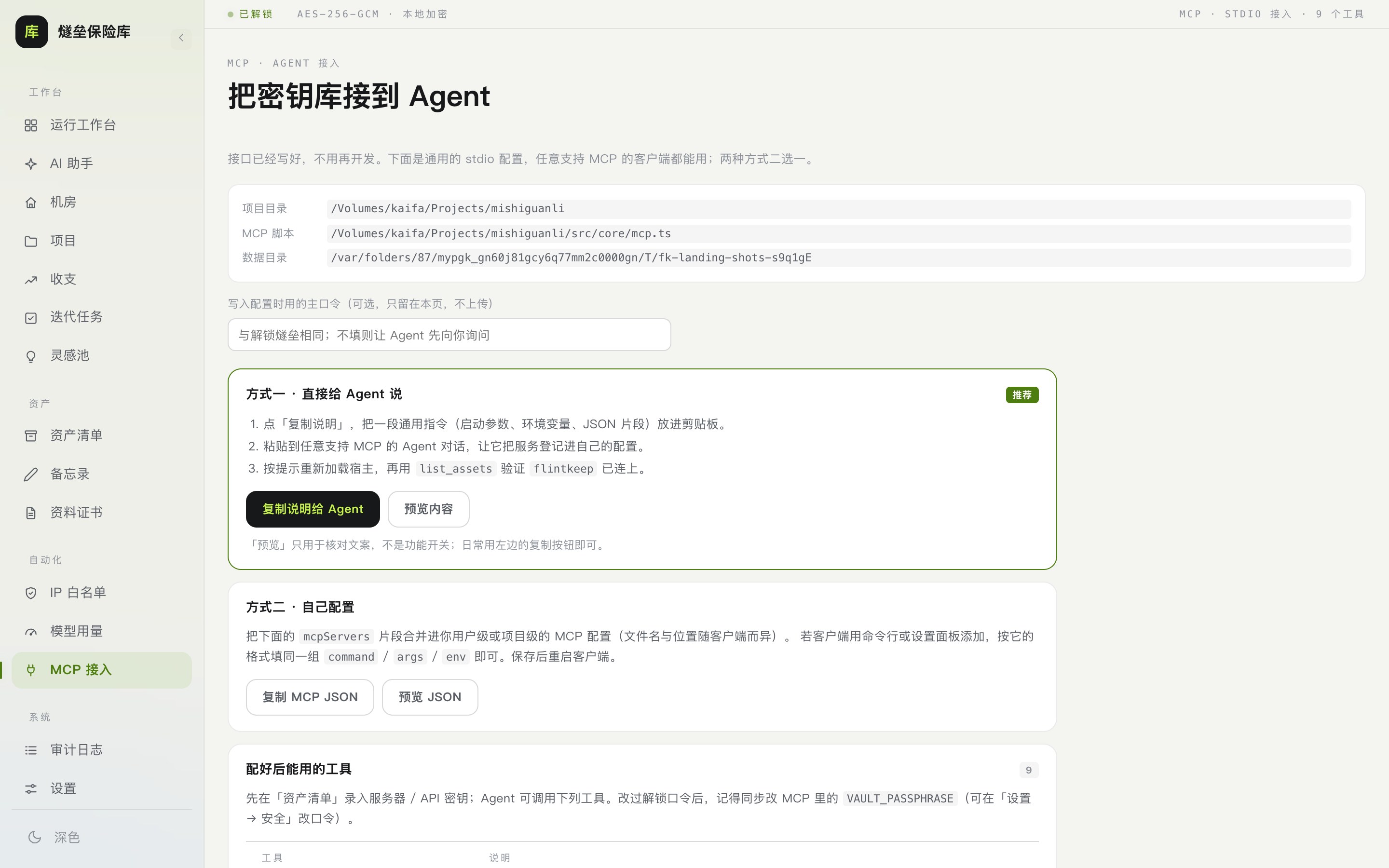
flintkeep.pages.dev / mcp
MCP access

01 / 06

Click the centre shot to enlarge · ← → to browse · hover to pause autoplay

Features

More than a password manager

Credentials, assets, project files, an AI assistant and a run workbench — one vault for all of it, entirely on your device.

🔐

Encrypted on-device

The whole vault is written to your local disk as AES-256-GCM ciphertext. Locked, it's unreadable; lose a backup file and whoever finds it gets ciphertext, nothing else.

🤖

A vault that talks

A built-in AI assistant speaks MCP: ask for "the login key of server #7" and it's on your screen. Agents can register assets, check ports and run inspections.

⚡

Run workbench

Register how each local project starts, its dependencies and ports. One click to start and stop — dependencies are torn down with it, containers leave nothing behind.

📜

Full audit trail

Who touched which asset and when, every agent operation — the audit log keeps it all. Sensitive fields reveal on demand and hide again.

Security

Security is the architecture, not a slogan

Three principles baked into the design — not just written in the PR copy.

Keys never touch the cloud

Encryption and decryption happen on your device. There is no "cloud sync copy" and no server that could see your plaintext — because your data simply isn't there.

Open source, auditable

AGPL-3.0, fully public code. Don't take our word for it — build it yourself, or just read the source.

Least privilege

Agents access through allowlists, sensitive fields reveal on demand and re-hide afterwards, and every step lands in the audit log.

Your device · plaintext → AES-256-GCM → Ciphertext on local disk ← AI assistant · local MCP → Internet ✗
Design

How it is put together

One encrypted core, three ways in: the desktop UI, the MCP server your agent talks to, and a local proxy that injects the real secret. Nothing above the core ever holds a plaintext key.

Surface
Desktop UI · Vue 3 + Vite CLI · npm run fk Electron shell
Interfaces
MCP stdio · agent access Model B HTTP proxy · header / Basic / SigV4 SSH bastion · ssh -p 8789 token@127.0.0.1
Core
src/core · vault · schema · proxy · sshproxy · mcp · whitelist · ai-usage
Storage
AES-256-GCM ciphertext on local disk keystore.json · salt + verifier only PBKDF2 · 210 000 iterations

One core, three doors

The UI, the CLI and the MCP server all call src/core. Fix a rule once — allowlists, redaction, audit — and it applies everywhere. There is no second implementation to drift.

The agent gets a token, not a key

Model B hands the agent a short-lived token plus a local proxy address. The real credential is injected server-side and the token dies after use. HTTP, cloud signing and SSH follow the same rule.

Keys live in memory only

The master key is derived from your passphrase with PBKDF2 (210k rounds); the keystore keeps only salt and a verifier. Lock the app and decryption stops — plaintext never reaches the disk.

Stack Electron Vue 3 Vite TypeScript Node http MCP stdio · no SDK AES-256-GCM PBKDF2

Why not just a password manager?

FlintKeep 1Password / Bitwarden Infisical / Vault
Encrypted vault stays on your device ✓ cloud sync server-side
Agent fetches credentials over MCP ✓ no CLI / SDK
Real secret never enters agent context ✓ no partial
Cloud request signing (SigV4 / Aliyun / Tencent) ✓ no no
Local SSH bastion with token login ✓ no no

1Password™ is a trademark of AgileBits Inc.; Bitwarden, Infisical and HashiCorp Vault belong to their respective owners. FlintKeep is not affiliated with them — this table only compares features.

Voices

What people say

Layout placeholders — replace with real quotes before launch.

Z SAMPLE
L SAMPLE
周 SAMPLE
Community

Maintainer & community

FlintKeep is an AGPL-3.0 open-source project. Issues, patches and translations are all welcome.

01 · REPORT

Open an issue

Tell us what the vault should do that it does not, or what broke. Repro steps beat screenshots.

GitHub Issues ↗
02 · CONTRIBUTE

Docs, translations, adapters

The i18n files, this landing page and the injection adapters are the easiest places to start.

03 · DISCLOSE

Security first

Found a hole? Ping the maintainer privately first — do not paste exploit details into a public issue.

License: AGPL-3.0-only. Fork it, run it, change it; if you offer a modified version as a service, publish your changes. The name and logo are not covered by the license.

Roadmap

Shipped

  • Encrypted core, audit chain, rotation reminders
  • MCP access, HTTP proxy injection, SSH bastion
  • Aliyun / Tencent IP allowlist auto-update
  • Tray app, auto-lock, encrypted backups

Next

  • Signed builds and auto-update
  • Audit log export
  • UI localisation (zh / en)

Wanted

  • Team vault (self-hosted, local)
  • Read-only mobile view
  • More injection adapters (K8s, databases)
FAQ

Straight answers

Star it if it helps

Open GitHub
Get Started

Bring the vault back home

Free and open source. Grab an installer from GitHub Releases — or build it yourself from the source.

macOS · Windows · Linux
Contact

Something not working? Ping me

Usage questions, feature requests, a bug you want fixed — scan the code and say hi. If you found a vulnerability, tell me privately first.

Personal QR codes expire — if this one has, open an issue on GitHub instead.

WeChat contact QR code
WeChat · 李先生 Scan to add · mention “FlintKeep”